
Settings: General
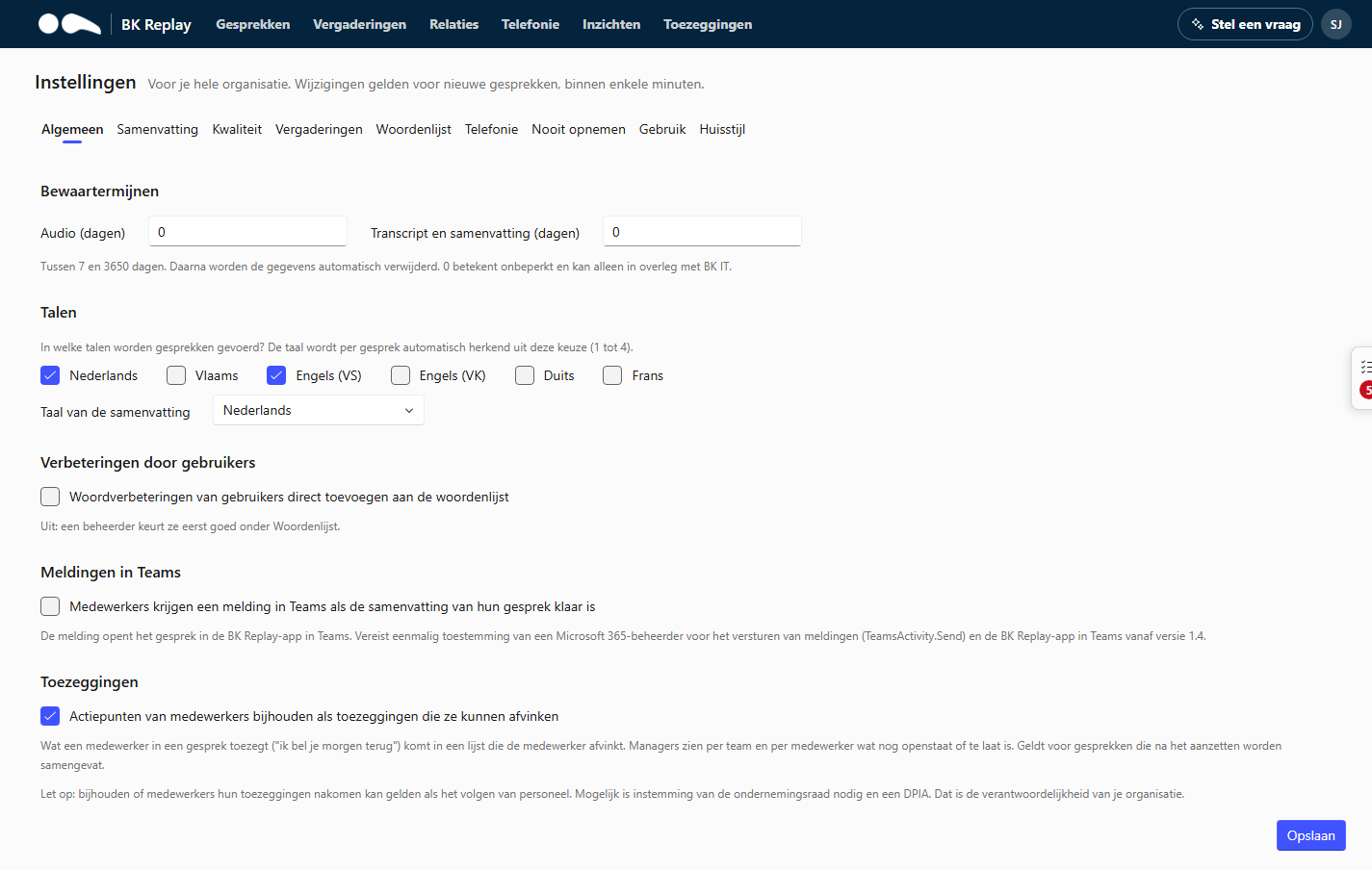
Retention periods
How long BK Replay keeps data, in days, separately for:
- Audio: the recording itself.
- Transcript and summary: the text, the summary and what is derived from it (such as promises).
Choose between 7 and 3650 days. After that, the data is deleted automatically; this happens daily. A shorter period also applies to existing calls that are already older. 0 means keep indefinitely and is only possible in consultation with BK IT.
A common choice is to keep the audio shorter than the text, for example audio 90 days and transcript one year. After the audio is deleted, the transcript and summary stay until the end of their own period.
Languages
Which languages are calls held in? Choose 1 to 4 languages from Dutch, Flemish, English (US), English (UK), German and French. BK Replay automatically recognises per call which language is spoken, from this choice. Only choose languages that really occur: fewer languages gives better recognition.
Summary language: the language summaries, action items and topics are written in (Dutch, English, German or French), regardless of the language of the call.
Translating summaries
Do people in your organisation use the portal in English while the summaries are in Dutch (or the other way round)? Then switch on Also translate summaries into the portal language (Dutch or English).
- Anyone using the portal in a different language from the summaries sees the summary, action items and topics translated: in the Calls list, on the call page, for meetings, in promises and in the summary on a relation's page. Searching the list also finds words from the translation.
- The call page shows Translated by AI, with Show original to see the original summary.
- Transcripts, categories, statistics and quality answers stay in the summary language, as do exports, Autotask tickets and the answers of Ask a question, Copilot and Claude.
- When switching on, you choose Only new summaries, from now on or Also the calls and meetings of the last 30 days. Below the setting it then says from when summaries are translated.
- Every summary is processed by the AI a second time: this costs extra AI usage. A translation appears a few minutes after the summary.
If it says "Available once your organisation's database has been updated", contact BK IT.
Corrections by users
Users can correct a misheard word in a transcript (see Viewing a call). Such a correction also becomes a suggestion for the word list.
- On: suggestions go straight into the word list.
- Off: an administrator approves them first under Word list.
Notifications in Teams
On: employees get a notification in Teams as soon as the summary of their call is ready. The notification opens the call in the BK Replay app in Teams.
Requires one-time consent from a Microsoft 365 administrator for sending notifications (TeamsActivity.Send) and the BK Replay app in Teams version 1.4 or later. See The Teams app.
Promises
On: what an employee promises in a call goes into a list the employee ticks off, and managers see per team and per employee what is still open or overdue. See Promises. Applies to calls summarised after switching on. Off by default.
Tracking whether employees keep their promises can count as monitoring staff. Works council consent and a DPIA may be required. That is your organisation's responsibility.
If it says "Available once your organisation's database has been updated", contact BK IT.