
Viewing a call
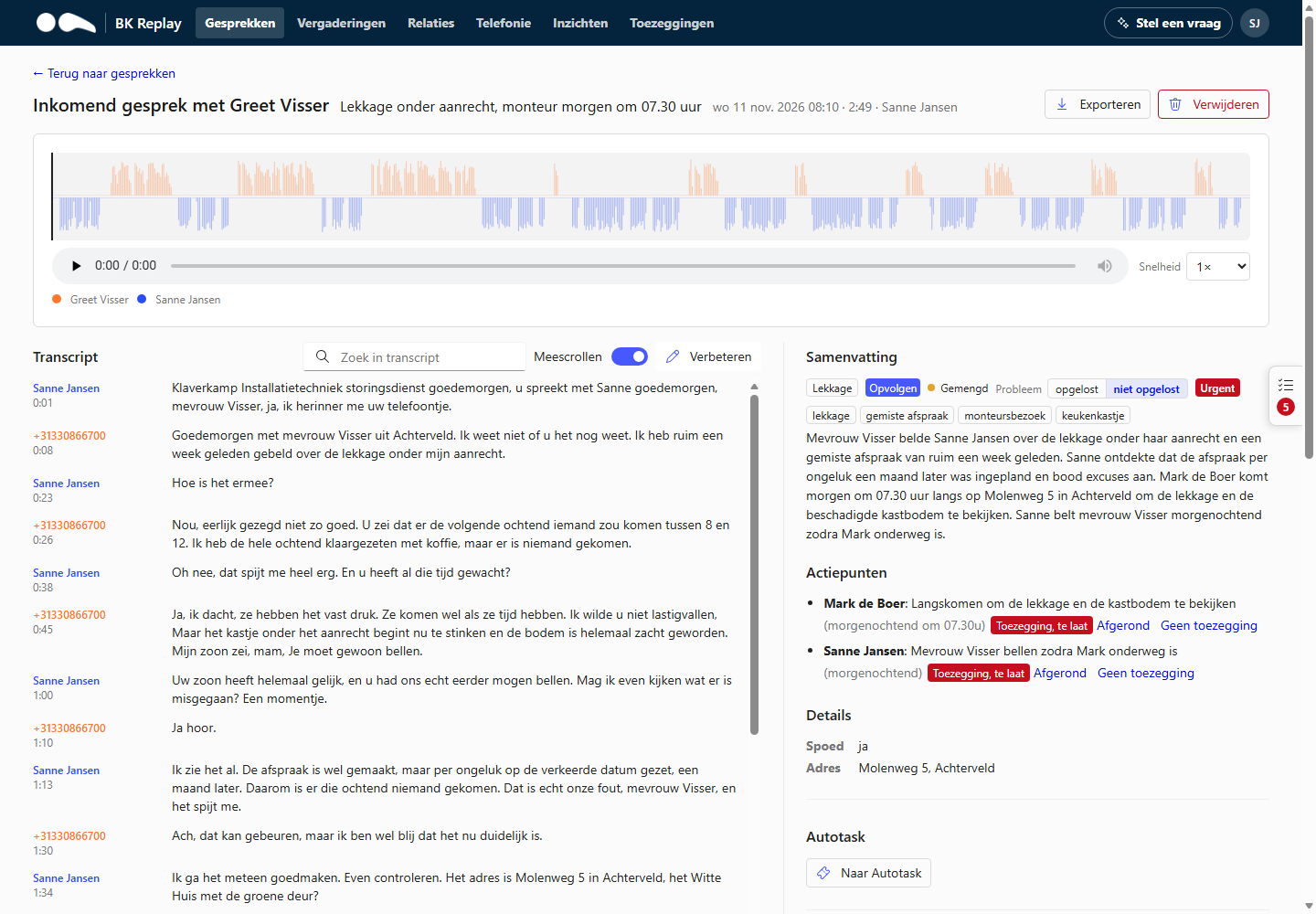
Click a call in the list to open it. At the top you see the direction, with whom, the title from the summary, the time, the duration and the employee.
Listening back
- The waveform shows both sides of the call in their own colour: the external party and the employee. Click in the waveform to jump to that moment.
- Under Speed, choose a playback speed from 0.75× to 2×.
- Listening back requires the User role or higher. Every time someone listens to a call, it is recorded in the audit log.
Transcript
The transcript shows what was said per speaker, with times.
- The part that is playing is highlighted. With Auto-scroll the transcript follows playback.
- Click a sentence to play the call from there.
- Search transcript finds a word; the arrows go to the next match.
- Underlined words have been corrected, automatically through the word list or by a colleague. Hover over them to see the original text.
Correcting a misheard word
Is a name or term wrong in the transcript? Choose Correct above the transcript, fill in what it said (Misheard) and what it should be (Should be). The correction applies to this call straight away and becomes a suggestion for the word list, so it goes right next time. Whether a suggestion is accepted directly or first approved by an administrator is set under General.
Summary
The summary explains in a few sentences what the call was about, followed by:
- Action items: what needs to happen, and by whom (the organisation or the caller). If promises are on, the employee's action items show whether they are done, and the employee can tick them off here.
- Follow up: whether something still needs to happen.
- Category and topics.
- Problem reported / Problem solved: whether the caller had a problem and whether it was solved during the call. If this is wrong, change it; the AI learns from corrections.
- Any extra fields your organisation set up, such as a ticket number.
The summary is written in the language you choose under General, and follows the instructions under Summary. If you use the portal in another language and translation is on, you see the summary translated, with Translated by AI and Show original.
Contact and earlier calls
If the number is known in your CRM, you see the contact and the company, with a link to all calls with that person, company or number (see Relations). Earlier calls lists the previous calls with the same relation.
Quality
If your organisation set up quality questions, the AI's answers are shown here: yes, no or n/a with a short explanation. Visible to Managers and Administrators only.
Sending to your PSA (Autotask)
If your organisation has an Autotask integration, anyone who can see the call can use Send to Autotask to create a new ticket or a note on an existing ticket. Title, description, company and contact are filled in beforehand and can be changed. The action items can become a checklist on the ticket, and the call's duration can be logged as hours for the employee. A call can only be sent once.
Exporting
With the Exporteren (Export) role you download a call as a zip file with the audio, transcript, summary and details. You can give a reason (for example a customer request). Every export is recorded in the audit log.
Deleting
Managers and Administrators can delete a call permanently, for example at the request of a data subject (GDPR). This removes the recording, transcript, summary and everything derived from it. Give a reason and confirm with I understand this is permanent. The audit log keeps who deleted which call and when, without the content.
Calls are also deleted automatically after the retention period.