
Ask a question
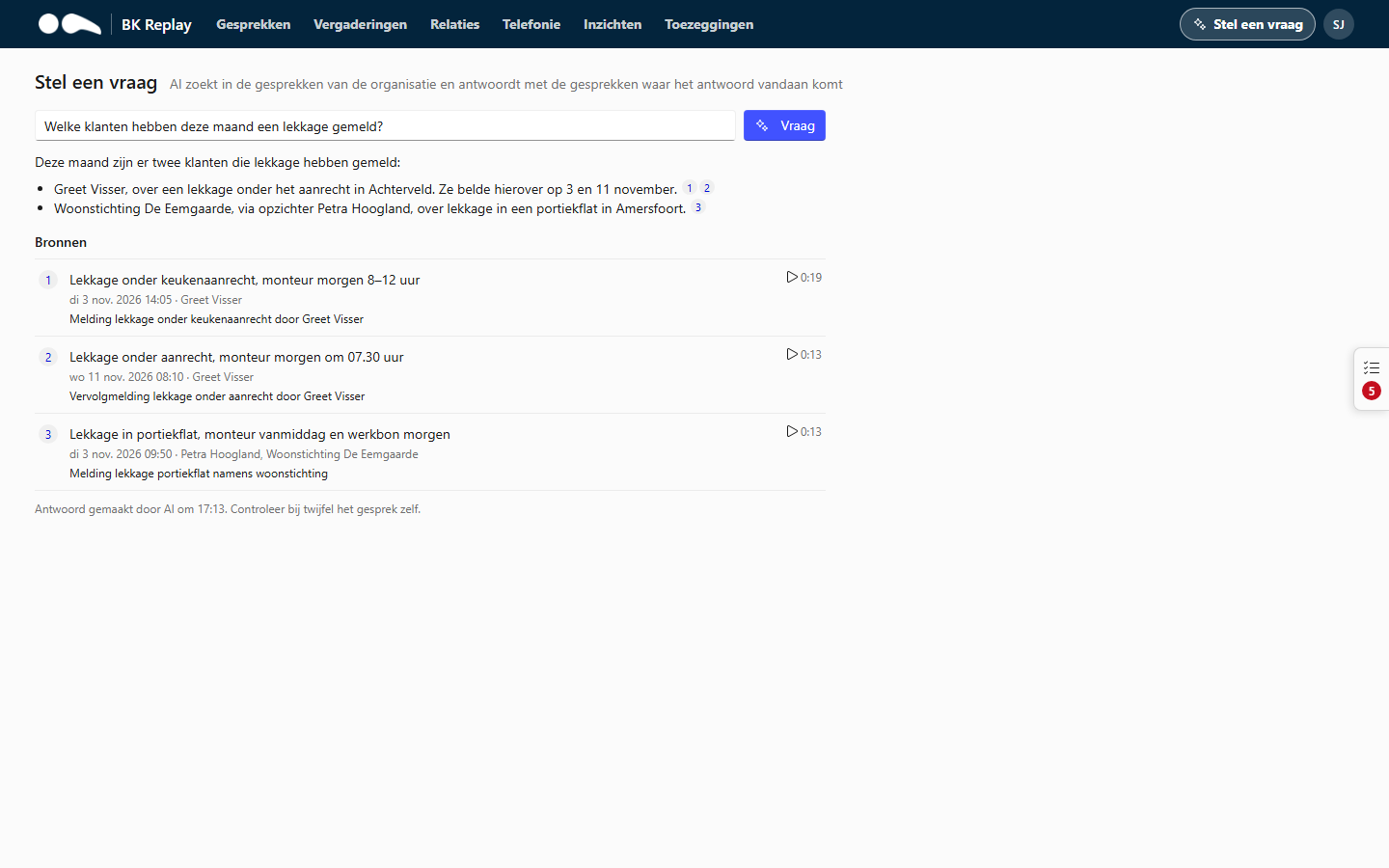
With Ask a question (top right in the portal) you ask a question about your calls in plain language. The AI searches the calls you are allowed to see and gives a short answer, with the calls the answer comes from.
Examples:
- "Who called last week about a leak?"
- "What did we promise customers this week?"
- "Which customers were unhappy this month, and why?"
- "What do I still have open?"
How it works
- While the AI searches, you see the steps ("Searching calls for ...", "Reading the transcript of ..."). A question usually takes ten to thirty seconds.
- Below the answer are the sources: buttons to the calls that were used, where possible at the moment it was said.
- If not everything could be checked (for example with a very broad question), the answer says so. Make the question more specific, for example with a period or a name.
- It is one question with one answer, not a chat. Ask a follow-up as a new question.
A relation's page has the same box, limited by default to the calls with that relation.
What the AI does and does not see
- Only the calls you are allowed to see in the portal. A User gets answers about their own calls, a Manager about those of the whole organisation.
- Sources are checked by BK Replay itself: an answer can only refer to calls the AI actually read and that you are allowed to see.
- Your question and the answer are not stored. The audit log only records that a question was asked and which calls were read for it.
- Each user can ask twenty questions per hour.
Always check important answers in the call itself: the AI can make mistakes.