
Telephony and missed calls
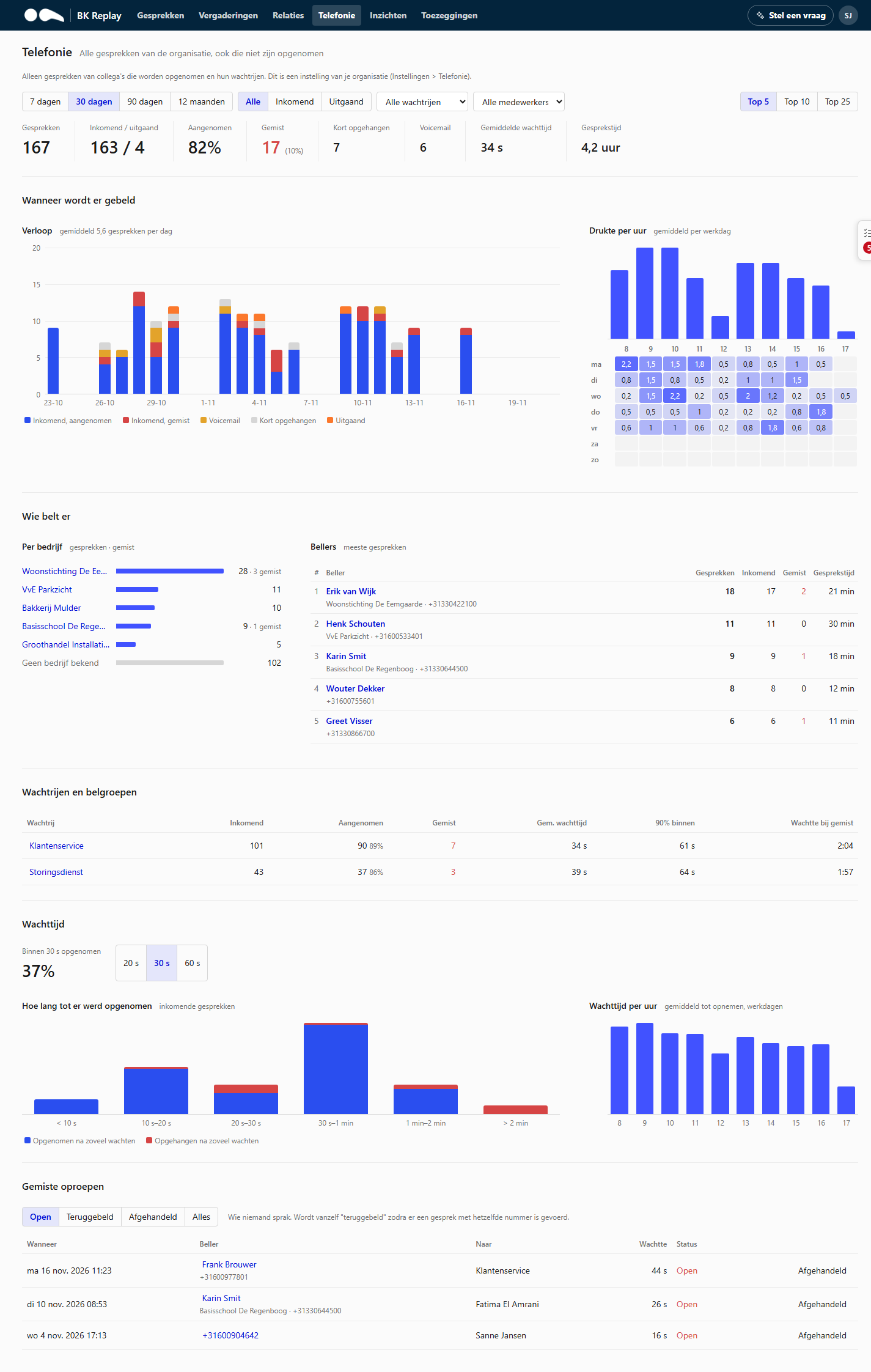
The Telephony page shows how calls are made: how many, when, by whom, and what is missed. The figures come from Microsoft Teams call data, not from the recordings. That is why calls that were not recorded count too, as do missed calls.
Managers and Administrators see the whole page. A User sees Missed calls in the menu: the missed calls of their own number and of the queues they answer for.
Which calls count
- Only phone calls with external numbers, incoming and outgoing. Internal Teams calls do not count.
- If Only colleagues who are recorded is on under Settings > Telephony, only calls of colleagues with recordings count, plus the queues they answer for. The page then shows a notice at the top.
- Queues an administrator removed from the statistics (for example a test number) do not count in the figures; their missed calls do stay on the call-back list.
- Call data is fetched every ten minutes, so a call appears within a quarter of an hour.
What you see
At the top, choose a period (7 days to 12 months), direction, queue or employee.
- Tiles: number of calls, incoming and outgoing, percentage answered, missed, hung up quickly (the caller hung up within a few seconds), voicemail, average wait time and total talk time.
- When are calls made: the daily trend (answered, missed, voicemail, outgoing) and busy hours per weekday. Useful for staffing.
- Who calls: the companies and callers with the most calls, and how often they reached nobody. Names come from your CRM if there is an integration.
- Queues and call groups: per queue, call group or call centre number the number of incoming calls, how many were answered and missed, the average wait time, within how many seconds 90% were answered and how long callers waited before hanging up.
- Wait time: the share answered within 20, 30 or 60 seconds, how long it took until calls were picked up and the wait time per hour.
- Per employee: how often each employee was called, how often and how quickly they answered and how many calls they had. Only visible if an administrator switched this on (see Settings > Telephony).
Missed calls
At the bottom is the call-back list: calls in which the caller reached nobody.
- Open: not called back yet.
- Called back: set automatically as soon as a later call with the same number took place, incoming or outgoing.
- Handled: closed by hand, for example because the customer was helped by email. Reopen puts it back.
Who sees a queue's missed calls depends on the members of that queue. By default these are the colleagues the queue rang in the last 30 days or who answered a call from it. An administrator can fix the list under Settings > Telephony.
Basic and add-on
The basic part (numbers, trend, busy hours and who calls) is available for every organisation for which BK IT has switched on collecting call data. The call-back list, the queues and the figures per employee are part of the Telephony insight add-on. Ask BK IT if you want to use it.